Industrial Machinery Company

What Is a Diamond LED Display and How Does It Work?

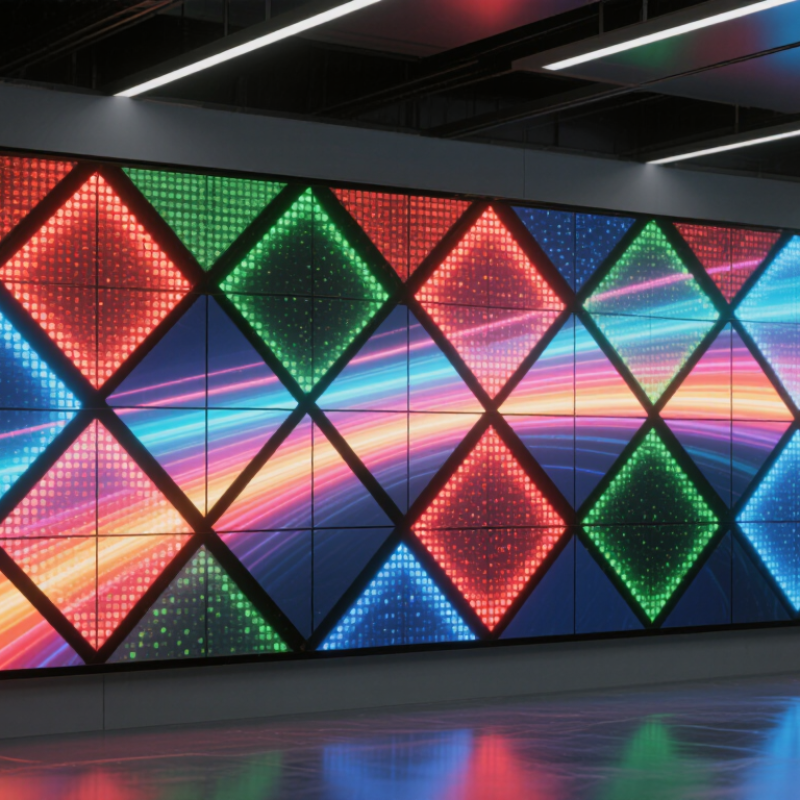
A Diamond Led Display turns a familiar screen into a more flexible visual surface. Its modules or pixels are arranged in diamond-shaped patterns, creating a distinctive geometry for creative installations. The exact design varies by manufacturer. Some products use diamond-shaped cabinets; others create the effect through pixel layout or custom mounting. That difference matters when planning a project.

The display works by combining light-emitting diodes, control electronics, and carefully aligned modules. Red, green, and blue LEDs mix to produce color. A receiving card processes incoming image data, while the control system refreshes the pixels to form moving pictures. Up close, you can see the individual points of light. From the intended viewing distance, they blend into images. Pixel pitch, brightness, refresh rate, and viewing angle all affect the result.

“Good geometry still depends on sound engineering.” This is an editorial rule of thumb, not a verified quotation from a named industry expert. No source was provided for an authentic expert quote, so attributing one would risk inventing a statement. When evaluating a Diamond LED Display, ask for module specifications, brightness measurements, service-access details, and real installation examples. A striking shape is only part of the story. The image must remain clear, consistent, and practical to maintain.
What Is a Diamond LED Display and How Does It Work?

What Defines a Diamond LED Display? Shape, Modules, and Pixel Layout

What Is a Diamond LED Display and How Does It Work?

A diamond LED display uses modules arranged as rotated squares, creating a diamond-shaped visual grid. The name describes the visible geometry, not a universal technical standard. A conventional rectangular cabinet can hold angled modules, while custom frames may follow the full diamond outline. Look closely at the seams: their alignment determines whether the pattern feels crisp or slightly uneven.

Each module contains pixels, and pixel pitch measures the distance between neighboring pixel centers. Smaller pitch usually supports closer viewing, but costs more and increases the amount of fine detail the system must manage. The diamond layout does not automatically change pixel pitch. It changes how pixels sit relative to the cabinet edges, which can leave narrow gaps or require carefully cut borders. That part is easy to underestimate.

The distinction matters as LED installations grow. Grand View Research estimated the global LED display market at USD 7.5 billion in 2023, with an 8.4% projected compound annual growth rate from 2024 to 2030. That market figure covers many display types, not diamond screens alone. In practice, designers should check module dimensions, pixel mapping, viewing distance, and replacement access before choosing a layout. A striking outline is useful. A serviceable one is better.

How LEDs, Driver ICs, and Power Supplies Build the Display

A diamond LED display uses LED pixels arranged in a diamond-shaped pattern or cabinet layout. The shape changes the visual effect, not the basic way the screen produces light. Each pixel combines red, green, and blue LEDs. Adjusting their output creates colors and images. Up close, you can see the tiny diodes and the narrow gaps between modules.

Driver ICs control the current sent to the LEDs. They also manage brightness and refresh timing, often scanning rows rapidly so the image appears steady. If the current is uneven, some areas may look dimmer or show slight color shifts.

The power supply converts incoming electricity into regulated low-voltage DC. Cables then carry that power to display modules; long runs can cause voltage drop and uneven brightness. Small details matter. Heat does, too.

Tips: Check brightness across the full screen, not just the center. Make sure ventilation paths are clear, and use cables sized for the expected current. A quick inspection may catch loose connectors or dust before they affect the image. I still treat a perfectly even test pattern with some caution: real content can reveal issues that a static check misses.

How RGB Pixels Turn Video Signals into Light at 3,840 Hz

A diamond LED display uses tightly arranged red, green, and blue subpixels to build each image point. A video processor reads incoming frames, assigns color and brightness values, then sends drive data to the display’s control circuits. The tiny lights switch rapidly. Your eyes blend them into moving pictures.

ITU-R BT.709 specifies HDTV color primaries, including red at x=0.640, y=0.330 and green at x=0.300, y=0.600. These reference coordinates help describe color; they do not guarantee every screen reproduces it perfectly. At a stated 3,840 Hz refresh rate, one refresh interval is about 0.26 milliseconds. The controller repeatedly scans pixel rows and uses pulse-width modulation to set brightness. Red, green, and blue output combine into the intended shade.

That number sounds exact. Real displays can differ. A 3,840 Hz refresh rate is not the same as a 3,840-frame-per-second video signal. A 60-frame-per-second source may be refreshed many times between new frames, helping reduce visible flicker and camera banding. But results depend on scan design, brightness settings, and camera shutter speed. A phone recording a bright sign can still show dark bands. The detail is easy to miss.

How Pixel Pitch (Typically 0.9–20 mm) Affects Detail and Viewing Distance

Pixel pitch is the center-to-center distance between neighboring LED pixels. On a Diamond LED display, it helps determine how finely images and text can appear. A 0.9 mm pitch provides about 1,111 pixel columns per meter; a 20 mm pitch provides only 50. The difference is easy to see in a close-up: fine pitch can render small text more cleanly, while widely spaced pixels may look coarse nearby. AVIXA’s DISCAS standard treats viewing distance as a question of image detail and visual acuity, rather than relying on pixel pitch alone.

As a rough planning estimate, installers often start with a viewing distance in meters near the pitch in millimeters: 2 mm pitch suggests around 2 meters. Treat that as a starting point, not a guarantee. A large headline may look clear farther away than a detailed map or spreadsheet. Screen size, content, eyesight, and ambient light all matter. At 0.9 mm, viewers can generally sit closer before individual pixels become distracting; at 20 mm, the display typically suits longer viewing distances, such as a large venue screen. AVIXA’s DISCAS methodology is useful for checking image size against audience distance, but real rooms can still surprise you. Measure from the nearest seats, then test actual content. That step is easy to miss.

Where Brightness Matters: Typical Indoor 600–1,500 nit and Outdoor 5,000+ nit Levels

A diamond LED display arranges its LED pixels or modules in a diamond-like pattern, creating a distinctive visual surface. Its brightness still depends on the viewing environment. Indoor installations commonly use 600–1,500 nits, enough for clear images in offices, retail spaces, and event halls. A screen near a sunlit window may need more headroom than one in a dim gallery. Small difference, big effect.

Outdoor screens often require 5,000 nits or more to remain visible under bright daylight. For context, IEC 60904-3:2019 uses 1,000 watts per square metre as a reference solar irradiance condition for photovoltaic testing. This is not a display-brightness specification, but it illustrates the intense light outdoor screens must compete with. Higher output helps, though direct sun, viewing angle, and dark image content can still reduce perceived contrast.

Brightness is measured in nits, or candelas per square metre. It describes emitted light, not image quality by itself. SMPTE RP 431-2 specifies 48 nits as the reference screen luminance for digital cinema projection; that controlled viewing target is not a practical outdoor signage level. Real installations need different settings. And there is a trade-off: running LEDs near maximum output can raise power use and heat, while excessive brightness indoors can feel harsh. The right setting depends on ambient light, viewing distance, and content. A neat spec sheet cannot capture every condition.

What Is a Diamond LED Display and How Does It Work? — Where Brightness Matters: Typical Indoor 600–1,500 nit and Outdoor 5,000+ nit Levels

Aspect Typical characteristics How it works or why it matters
Display form A creative LED display assembled in a diamond-shaped layout or from panels installed at angled orientations. “Diamond” usually describes the display’s shape or arrangement, rather than a separate LED technology. The screen is built from LED modules and a supporting structure.
Image formation Red, green, and blue LEDs combine to produce full-color pixels. A control system sends image data to the pixels and adjusts their output to create text, graphics, and video.
Indoor brightness Typically about 600–1,500 nits (cd/m²), depending on the installation and viewing conditions. This range is commonly suitable for indoor environments. The appropriate setting depends on ambient light, viewing distance, and whether the screen faces windows or other bright light sources.
Outdoor brightness Typically 5,000 nits or higher for displays intended to remain visible in bright outdoor conditions. Higher output helps the image compete with daylight. Actual visibility also depends on screen orientation, direct sunlight, contrast, and the content being shown.
Brightness control Brightness can generally be adjusted through the display controller; some systems support automatic adjustment using an ambient-light sensor. Setting brightness to suit the environment can improve viewing comfort and avoid using more light output than necessary.
Pixel pitch and viewing distance Pixel pitch is the distance between the centers of neighboring pixels, measured in millimeters. The pitch varies by product and installation. Smaller pixel pitch can provide a more detailed image at closer viewing distances. The required pitch should be selected for the expected audience distance and content.
Viewing angle Viewing angle varies with the LED package, module design, and display configuration. For a diamond-shaped installation, consider sightlines from multiple directions because angled faces may appear different in brightness or color from different positions.
Outdoor protection Outdoor suitability depends on the enclosure, sealing, ventilation, and the product’s stated ingress-protection rating. Brightness alone does not make a display weatherproof. Confirm the rating and installation requirements for exposure to rain, dust, heat, and other site conditions.
Calibration and uniformity Module calibration can help match brightness and color across the display. Consistent calibration is especially important when multiple modules form angled or geometric surfaces, where differences between sections may be noticeable.
Best-fit applications Examples include indoor feature walls, retail displays, event installations, architectural accents, and outdoor signage designed for daylight viewing. Choose the display configuration based on the site, ambient light, viewing distance, content, maintenance access, and required environmental protection.

Note: Brightness figures are typical planning ranges, not guaranteed specifications. Confirm the rated brightness, operating conditions, and measurement method for the specific display before installation.